Scheduler~
The scheduler runs time-based automation on the EVSE: at chosen hours of the week it can enable or disable charging, take the station in or out of service, or clamp the charging current to a fixed value. A typical use is charging only during a cheap night tariff, or limiting current during the day.
Because every rule is keyed to the wall-clock time, the scheduler is only useful once the device knows the correct time — either from NTP or set manually.
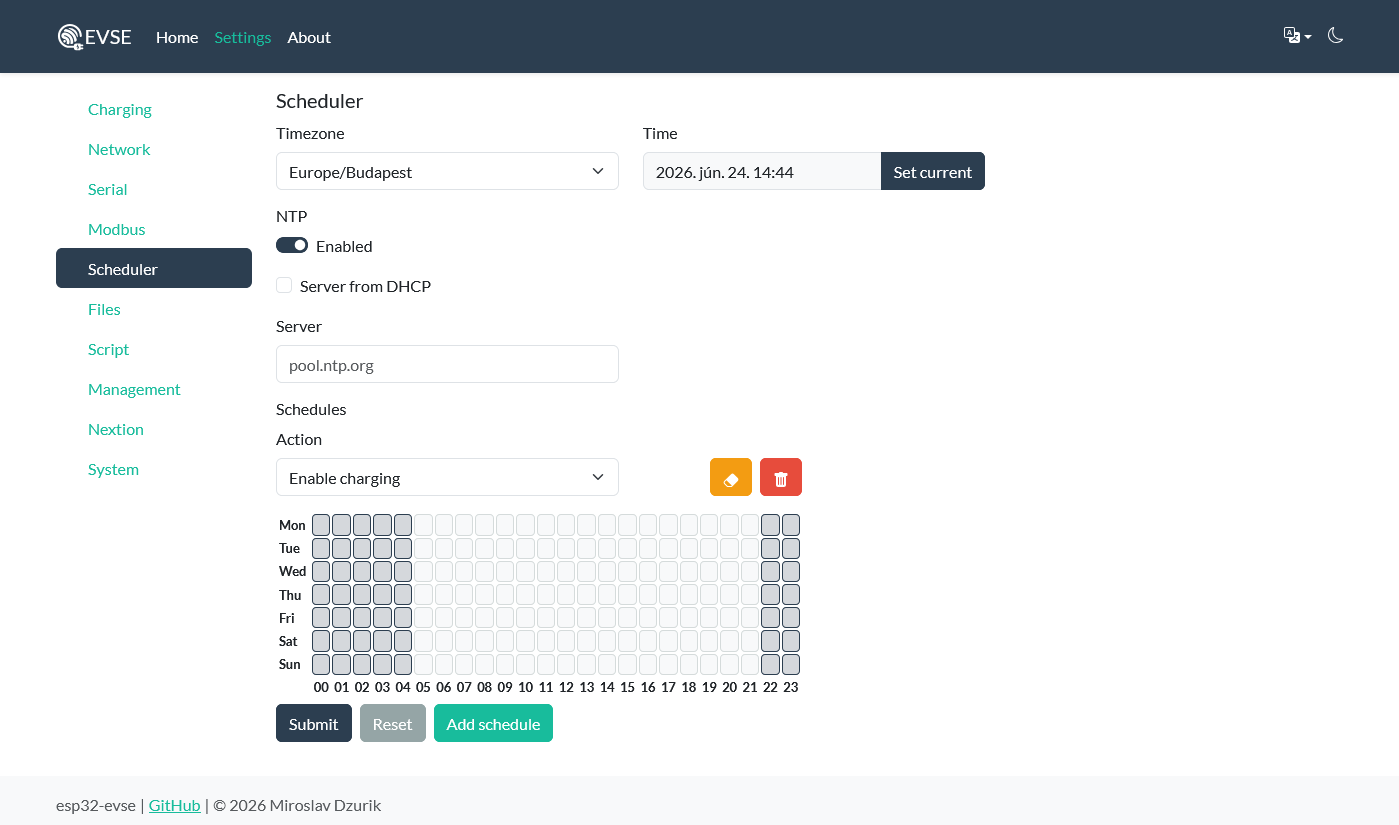
How it works~
Each rule (a schedule) pairs one action with a weekly pattern of active hours. The scheduler re-evaluates all rules:
- about one second after boot,
- at the top of every hour,
- whenever the clock is set via
POST /time, - and on every successful NTP sync.
Evaluation is edge-triggered per rule. For each schedule the scheduler asks "is the current hour active?" and compares the answer to the rule's previous state:
- hour becomes active → the rule's on action fires once,
- hour becomes inactive → the rule's off action fires once.
Nothing fires again until the active/inactive state actually changes, so a rule that stays active across several hours acts only at its start and end. After a reboot every rule starts in an "unknown" state and is resolved on the first evaluation, so the correct on/off action is applied for the current hour.
Note
The hourly granularity is intentional — schedules act on whole hours, not minutes. A rule with hour 22 active turns on at 22:00 and (if 23 is inactive) off at 23:00.
Actions~
| Action | On (hour active) | Off (hour inactive) |
|---|---|---|
Enable charging |
Enable charging | Disable charging |
Charger available |
Put EVSE in service | Take EVSE out of service |
Charging current 6A |
Set charging current to 6 A | Restore the default charging current |
Charging current 8A |
Set charging current to 8 A | Restore the default charging current |
Charging current 10A |
Set charging current to 10 A | Restore the default charging current |
Note
The fixed-current actions cover only 6 / 8 / 10 A. For other values, drive the current other ways, like from a Lua script instead.
Warning
Schedules do not coordinate with each other. If two rules touch the same
thing in the same hour (for example two Charging current * rules, or Enable and
Available with conflicting patterns), they are applied in array order and
the later one wins for that hour — and an off edge on one rule can undo an
on edge on another. Keep at most one rule per controlled quantity active at
any given hour.
The weekly hour pattern~
Under the hood, each schedule carries seven values, one per weekday (mon, tue, wed, thu,
fri, sat, sun). Each value is a 24-bit hour mask: bit h (value
2^h) set means the action is active during hour h, where hour 0 is
00:00–01:00 and hour 23 is 23:00–24:00.
So a value is the sum of 2^h for every active hour:
| Pattern | Active hours | Value |
|---|---|---|
| Whole day | 0–23 | 16777215 (0xFFFFFF) |
| Nothing | — | 0 |
| Night 22:00–06:00 | 22, 23, 0, 1, 2, 3, 4, 5 | 12582975 |
| Daytime 09:00–16:00 | 9–15 | 65024 |
Worked example for the night window: hours 0–5 contribute 2^0+…+2^5 = 63, and
hours 22–23 contribute 2^22 + 2^23 = 12582912; together 12582975.
Hour → bit value reference~
| Hour | Value | Hour | Value | Hour | Value |
|---|---|---|---|---|---|
| 0 | 1 | 8 | 256 | 16 | 65536 |
| 1 | 2 | 9 | 512 | 17 | 131072 |
| 2 | 4 | 10 | 1024 | 18 | 262144 |
| 3 | 8 | 11 | 2048 | 19 | 524288 |
| 4 | 16 | 12 | 4096 | 20 | 1048576 |
| 5 | 32 | 13 | 8192 | 21 | 2097152 |
| 6 | 64 | 14 | 16384 | 22 | 4194304 |
| 7 | 128 | 15 | 32768 | 23 | 8388608 |
Add the values for the hours you want active to get the weekday mask.
Time and NTP~
The scheduler reads the system clock in local time, so both the time source and the timezone matter.
| Field | Notes |
|---|---|
Enabled |
Enable the SNTP client |
Server |
NTP server hostname |
Server From DHCP |
Also accept an NTP server offered by DHCP (refreshed on new IP) |
timezone |
IANA zone name, e.g. Europe/Budapest |
timezone is the zone name, not a POSIX TZ string — the firmware maps the
Setting the clock without NTP: send the Unix epoch seconds to
POST /time; this also re-evaluates all schedules
immediately. With NTP enabled, each sync re-evaluates them too.
Note
Configuration (NTP settings, timezone and all schedules) is stored in NVS and survives reboots. After a power cycle the rules are restored and evaluated for the current hour as soon as the time is known.
Configuring over REST~
Read and write everything through one endpoint,
/config/scheduler. A GET returns the
current configuration; a POST replaces it (NTP/timezone plus the full
schedules array).
{
  "ntpEnabled": true,
  "ntpServer": "pool.ntp.org",
  "ntpFromDhcp": false,
  "timezone": "Europe/Budapest",
  "schedules": [
    {
      "action": "enable",
      "mon": 12582975, "tue": 12582975, "wed": 12582975,
      "thu": 12582975, "fri": 12582975, "sat": 0, "sun": 0
    }
  ]
}
This single rule enables charging on weekday nights (22:00–06:00) and keeps it disabled at all other times and on weekends.
curl -X POST http://192.168.4.1/api/v1/config/scheduler \
     -H 'Content-Type: application/json' \
     --data @scheduler.json
To remove all automation, send an empty schedules array.
Examples~
Cheap-tariff night charging~
Enable charging only between 22:00 and 06:00 every day:
{
  "action": "enable",
  "mon": 12582975, "tue": 12582975, "wed": 12582975,
  "thu": 12582975, "fri": 12582975, "sat": 12582975, "sun": 12582975
}
Reduced current during the day, full current at night~
Two rules. The first clamps to 6 A during the day; outside those hours it
restores defaultChargingCurrent, which you would set to your full current.
[
  {
    "action": "ch_cur_6a",
    "mon": 65024, "tue": 65024, "wed": 65024,
    "thu": 65024, "fri": 65024, "sat": 0, "sun": 0
  }
]
During 09:00–16:00 on weekdays the current is held at 6 A; at 16:00 it returns to the configured default.
Weekday-only availability~
Keep the station out of service at weekends:
{
  "action": "available",
  "mon": 16777215, "tue": 16777215, "wed": 16777215,
  "thu": 16777215, "fri": 16777215, "sat": 0, "sun": 0
}
See also~
- REST API:
/config/schedulerand/time /config/evse—defaultChargingCurrentused by thech_cur_*off action- Lua scripting — for automation beyond fixed hourly rules