LUA Scripting reference
Script capability allows custom functionality of controller, is based on Lua. You can perfom local automations or connect to cloud services.
Script settings are in web interface, when you can enable/disable this feature and browsing print output.
In Files web interface, you can edit Lua sources. At startup file /usr/lua/init.lua (or /usr/lua/init.luac if it's provided) will be executed.
Lua sources also can be edited through WebDAV, just open in file browser url: dav://<device-ip>/dav/usr/.
In addition to the standard Lua functionality, additional EVSE-specific modules are available to control the charging controller.
Component module~
This module provide core functionality for registering user components. Globally loaded, not need require this module.
At start, only once ist called startup file (/usr/lua/init.lua), When you need write some functionally stuff, which is called periodically or on some event must be provided as component.
Component is based on Lua coroutines and adds user friendly persistent configuration trought parameters.
Currently registered components are displayed in web interface, also with parameters form.
| Function | Signature | Description |
|---|---|---|
| component.register | (table):nil |
Register user component |
Component table definition~
| Key | Signature | Description |
|---|---|---|
| id | string |
Component unique id |
| name | string |
Component name |
| description | string\|nil |
Component description |
| params | table\|nil |
Parameters definition |
| start | (table\|nil):coroutine |
Function where is created coroutine, argument is parameters value table |
Parameter definition~
| Key | Signature | Description |
|---|---|---|
| type | string |
Type of parameter, possible values: "string"\|"number"\|"boolean" |
| name | string |
Parameter name |
| default | string\|number\|boolean\|nil |
Default value |
Component example:
component.register({
    id = "component1",
    name = "Test component 1",
    description = "The test component 1",
    params = {
        message = { type = "string", name = "Message", default = "Hello world!" }
    },
    start = function(params)
        message = params.message
        return coroutine.create(function()
            while true do
                print(message)
                coroutine.yield(1000)
            end
        end)
    end
})
Created coroutine in start function may have infinity loop, but must be in it placed calling coroutine.yield.
Paramter of coroutine.yield is optional number, which mean number of miliseconds wich coroutine is ommited from resumining.
No need to worry about started coroutine terminating, is terminated during script VM reloading or when user change component parameter values.
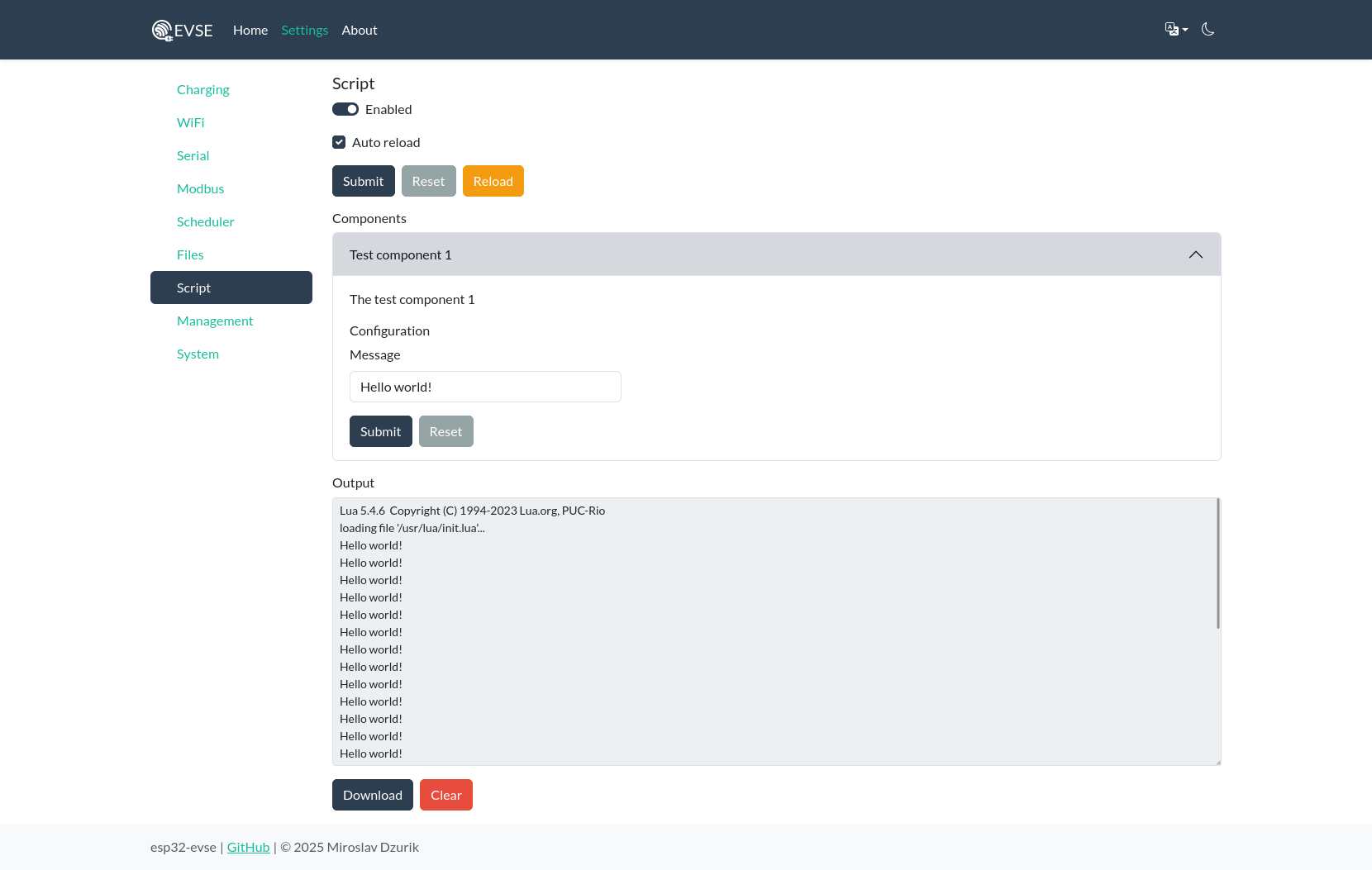
This will looks like in web interface:
Modules~
EVSE~
Root level module, for controlling charging controller.
| Constant | Description |
|---|---|
| evse.STATEA | State A |
| evse.STATEB1 | State B1 |
| evse.STATEB2 | State B2 |
| evse.STATEC1 | State C1 |
| evse.STATEC2 | State C2 |
| evse.STATED1 | State D1 |
| evse.STATED2 | State D2 |
| evse.STATEE | State E |
| evse.STATEF | State F |
| evse.ERRPILOTFAULTBIT | Error pilot_fault |
| evse.ERRDIODESHORTBIT | Error diode_short |
| evse.ERRLOCKFAULTBIT | Error lock_fault |
| evse.ERRUNLOCKFAULTBIT | Error unlock_fault |
| evse.ERRRCMTRIGGEREDBIT | Error rcm_triggered |
| evse.ERRRCMSELFTESTFAULTBIT | Error rcm_selftest_fault |
| evse.ERRTEMPERATUREHIGHBIT | Error temperature_high |
| evse.ERRTEMPERATUREFAULTBIT | Error temperature_fault |
| Function | Signature | Description |
|---|---|---|
| evse.getstate | ():number |
Get state, possible values evse.STATE... |
| evse.geterror | ():number |
Get error bits, possible values evse.ERR... bits |
| evse.getenabled | ():boolean |
Get charging enabled |
| evse.setenabled | (boolean):nil |
Set charging enabled |
| evse.getavailable | ():boolean |
Get controller available |
| evse.setavailable | (boolean):nil |
Set controller available |
| evse.getrequireauth | ():boolean |
Get require authorization |
| evse.setrequireauth | (boolean):nil |
Set require authorization |
| evse.getpendingauth | ():boolean |
Get pending authorization |
| evse.authorize | ():nil |
Authorize |
| evse.getchargingcurrent | ():number |
Get charging current in A |
| evse.setchargingcurrent | (number):nil |
Set charging current in A |
| evse.getdefaultchargingcurrent | ():number |
Get default charging current in A |
| evse.setdefaultchargingcurrent | (number):nil |
Set default charging current in A |
| evse.getmaxchargingcurrent | ():number |
Get max charging current in A |
| evse.setmaxchargingcurrent | (number):nil |
Set max charging current in A |
| evse.getpower | ():number |
Get charging power in W (deprecated, use energymeter module) |
| evse.getchargingtime | ():number |
Get charging time in s (deprecated, use energymeter module) |
| evse.getsessiontime | ():number |
Get session time in s (deprecated, use energymeter module) |
| evse.getconsumption | ():number |
Get consumption in Wh (deprecated, use energymeter module) |
| evse.getvoltage | ():number,number,number |
Get voltages in V (deprecated, use energymeter module) |
| evse.getcurrent | ():number,number,number |
Get current in A (deprecated, use energymeter module) |
| evse.getlowtemperature | ():number |
Get low temperature |
| evse.gethightemperature | ():number |
Get high temperature |
| evse.getconsumptionlimit | ():number |
Get session consumption limit in Wh |
| evse.getchargingtimelimit | ():number |
Get session charging time limit in s |
| evse.getunderpowerlimit | ():number |
Get session under power limit in W |
| evse.setconsumptionlimit | (number):nil |
Set session consumption limit in Wh |
| evse.setchargingtimelimit | (number):nil |
Set session charging time limit in s |
| evse.setunderpowerlimit | (number):nil |
Set session under power limit in W |
| evse.getdefaultconsumptionlimit | ():number |
Get default session consumption limit in Wh |
| evse.getdefaultchargingtimelimit | ():number |
Get default session charging time limit in s |
| evse.getdefaultunderpowerlimit | ():number |
Get default session under power limit in W |
| evse.getlimitreached | ():boolean |
Get charging limit reached |
Energy meter~
This module providing access to energy meter. Not globally loaded, need require this module.
| Constant | Description |
|---|---|
| energymeter.MODEDUMMY | Mode dummy |
| energymeter.MODECUR | Mode current sensing |
| energymeter.MODECURVLT | Mode current and voltage sensing |
| Function | Signature | Description |
|---|---|---|
| energymeter.getmode | ():number |
Get mode, possible values energymeter.MODEDUMMY... |
| energymeter.setmode | (number):nil |
Set mode, possible values energymeter.MODEDUMMY... |
| energymeter.getacvoltage | ():number |
Get AC voltage in V (for power calculation in mode MODEDUMMY & MODECUR) |
| energymeter.setacvoltage | (number):nil |
Set AC voltage in V (for power calculation in mode MODEDUMMY & MODECUR) |
| energymeter.getthreephases | ():boolean |
Get three phases |
| energymeter.setthreephases | (boolean):nil |
Set three phases |
| energymeter.getpower | ():number |
Get charging power in W |
| energymeter.getchargingtime | ():number |
Get charging time in s |
| energymeter.getsessiontime | ():number |
Get session time in s |
| energymeter.getconsumption | ():number |
Get consumption in Wh |
| energymeter.gettotalconsumption | ():number |
Get total consumption in Wh |
| energymeter.resettotalconsumption | ():nil |
Reset total consumption |
| energymeter.getvoltage | ():number,number,number |
Get voltages in V |
| energymeter.getcurrent | ():number,number,number |
Get current in A |
Board config~
This module providing values from board.cfg. Not globally loaded, need require this module.
| Constant | Description |
|---|---|
| boardconfig.ENERGYMETERNONE | Energy meter none |
| boardconfig.ENERGYMETERCUR | Energy meter current |
| boardconfig.ENERGYMETERCURVLT | Energy meter current and voltage |
| boardconfig.SERIALTYPENONE | Serial type none |
| boardconfig.SERIALTYPEUART | Serial type UART |
| boardconfig.SERIALTYPERS485 | Serial type RS485 |
| Value | Description |
|---|---|
| boardconfig.devicename | Name of the device (string) |
| boardconfig.proximity | Has PP detection (boolean) |
| boardconfig.socketlock | Has socket lock (boolean) |
| boardconfig.rcm | Has residual current monitor (boolean) |
| boardconfig.energymeter | Energy meter (number), possible values boardconfig.ENERGYMETER... |
| boardconfig.energymeterthreephases | Is energy meter three phases (boolean) |
| boardconfig.serials | Type of serials (number array), possible values boardconfig.SERIALTYPE... |
| boardconfig.onewire | Has onewire bus (boolean) |
| boardconfig.temperaturesensor | Has temperature sensor on onewire (boolean) |
| boardconfig.auxinputs | AUX digital input names (string array) |
| boardconfig.auxoutputs | AUX digital output names (string array) |
| boardconfig.auxanaloginputs | AUX analog input names (string array) |
Example:
AUX~
This module providing access to AUX. Not globally loaded, need require this module.
| Function | Signature | Description |
|---|---|---|
| aux.write | (string):boolean |
Set digital output value |
| aux.read | (string):boolean |
Get digital input value |
| aux.analogread | (string):number |
Get analog input value |
MQTT~
This module providing access to MQTT broker. Not globally loaded, need require this module.
| Function | Signature | Description |
|---|---|---|
| mqtt.client | (uri: string [, user: string] [, password: string]]):table |
Create mqtt client |
| mqtt.client:connect | ():boolean |
Connects to the broker, durring wail call coroutine.yield, on succes return true |
| mqtt.client:disconnect | ():nil |
Disconnect from the broker |
| mqtt.client:subscribe | (topic: string, callback: function(topic: string, data: string)):nil |
Subscribe to topic |
| mqtt.client:unsubscribe | (topic: string):nil |
Unsubscribe from topic |
| mqtt.client:publish | (topic: string, data: string [, qos: number = 1] [, retry: number = 0]]):nil |
Publish message |
Example:
local mqtt = require("mqtt")

local client = mqtt.client("mqtt://broker.hivemq.com:1883")

if client:connect() then
  client:subscribe("test/message", function(topic, data)
    print(topic, data)
  end)
end
JSON~
This module providing JSON serialization & deserialization. Not globally loaded, need require this module.
| Function | Signature | Description |
|---|---|---|
| json.encode | (table\|number\|boolean\|string\|nil[, formated: boolean]):string |
Encode Lua value to JSON |
| json.decode | (string):table\|number\|boolean\|string\|nil |
Decode from JSON to Lua value |
Example:
local json = require("json")

local value = {
  num = 123,
  str = "abc",
  logical = true
}
print(json.encode(value, true))
Serial~
This module providing serial port communication. Not globally loaded, need require this module.
| Function | Signature | Description |
|---|---|---|
| serial.open | ():table\|nil |
Open serial port, if is available or not already opened |
| serial:read | ():string\|nil |
Read bytes from RX buffer or return nil if is empty |
| serial:write | (string):nil |
Write bytes to TX buffer |
| serial:flush | ():nil |
Flush TX buffer |
Example:
local serial = require("serial")

local port = serial.open()

local rcv = port:read()
print(rcv)

port:write("AT?")
Examples~
For better code readability, each component is in its own script file. The main script init.lua imports them. You can load multiple scripts from the init script:
File /usr/lua/init.lua:
Naturally, only include in this file the ones you need.
Note
Resources on ESP32 are limited. Don't overwhelm the system with many complex scripts, as it may run out of memory, which may affect other functions aswell.
Emergency stop button~
Script to handle an emergency stop button connected to an AUX input:
File /usr/lua/stopbutton.lua:
local evse = require("evse")
local aux = require("aux")
local boardconfig = require("boardconfig")
local stopped_by_button = false

function contains(table, value)
    for _, v in ipairs(table) do
        if v == value then
            return true
        end
    end
    return false
end

return {
    id = "stopbutton",
    name = "Emergency stop button",
    description = "Set charger to not available when AUX input has targeted value",
    params = {
        aux = { type = "string", name = "Input name", default = "IN1" },
        activehigh = { type = "boolean", name = "Active high", default = true }
    },
    start = function(params)
        print("starting stopbutton...")

        if not contains(boardconfig.auxinputs, params.aux) then
            error("unknown aux input")
        end

        return coroutine.create(function()
            while true do
                local value = aux.read(params.aux)
--                print("Input read: ".. tostring(value))
                if (not params.activehigh) then
                    value = not value
                end
                if not value ~= true then
                    if not evse.getavailable() == false then
                        evse.setavailable(false)
                        stopped_by_button = true
                    end
                end
                if not value ~= false then
                    if stopped_by_button == true then
                        evse.setavailable(true)
                        stopped_by_button = false
                    end
                end
                coroutine.yield(1000)
            end
        end)
    end
}
This will comply with the following: - with the emergency button pressed, will turn off the Available switch on EVSE (connected between +12V and IN1) - it will force the Available switch off as long as the button is pressed down - after the emergency has been solved, the disengage of the button will turn back on the Available switch - usage of the the Available switch through the display or the web UI can be independent from the emergency button as long as it's not pressed (eg. can be used to make it "out of order" etc.) - if the Available switch was turned off through the display or the web UI, it's not possible to turn it back on by pressing and releasing the emergency button.
Use an NO mushroom button which locks itself in when pressed, rotate its head to disengage.
Home Assistant and ThingsBoard~
See Integration Examples how to interconnect with Home Assistant and ThingsBoard using Lua scripts.